 LATEST MANDAL PARISHAD NEWS
MPDO POLAVARAM

Free PDF Compressor
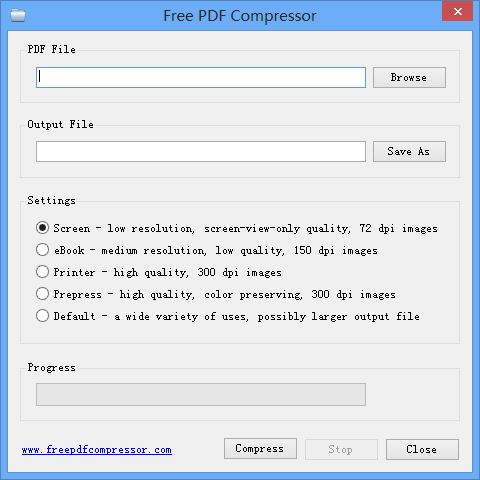
Free PDF Compressor is a free PDF compression software to enable you to effectively reduce the size of PDF files. Software is simple and easy to use, select an existing PDF file, and hit button "Compress", a compressed PDF file will be created, page by page, a progress bar will show progress of the whole compression process.
This software is completely freeware, free for personal and non-commercial use.

Why is there a need to compress a PDF file? Some PDF files are large, especially PDF documents that contains many images, these files open very slowly, and are not easy to store, transfer and share. Now you can use this free PDF compression software to compress these files with an acceptable quality. At the same time, by reducing PDF files size, you can use PDF as your ebook format, easy to read PDF files on mobile phone, send by email as attachments, or upload and share with your friends.
This software supports five different compression settings:
- Screen - low resolution, screen-view-only quality, 72 dpi images
- eBook - medium resolution, low quality, 150 dpi images
- Printer - high quality, 300 dpi images
- Prepress - high quality, color preserving, 300 dpi images
- Default - a wide variety of uses, possibly larger output file
These five compression settings represent five different compression ratio, generally, you can get a smallest output file with "Screen" setting, and get a biggest output file with and "Prepress" setting. But, please note, for a few PDF files, the resulting file will be large with "Screen" setting, in this case, you need to try different settings.
Make a free website with Yola